My Review Links Logo

How to Find Your Google Business Review Request Link.

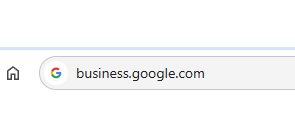
A web browser address bar displays the URL
Step #1
Access Your Google Business Account

In your Internet browser address bar type https://business.google.com. You will need to login with an email address that has access to the business profile. If you have multiple businesses select the business you want to get the review link for. 

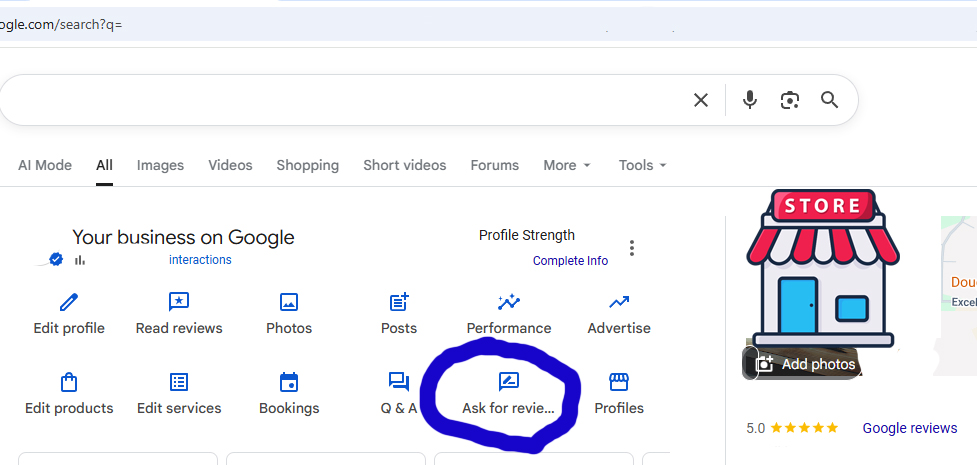
A Google search page for “Your business on Google” displays options like Edit profile, Read reviews, and Photos. The “Ask for reviews” option is circled in blue, helping you find your Google Business review link easily. A store icon appears on the right.
Step #2
Click On Ask For Review
When you click on ask for review a window will pop up with your link.
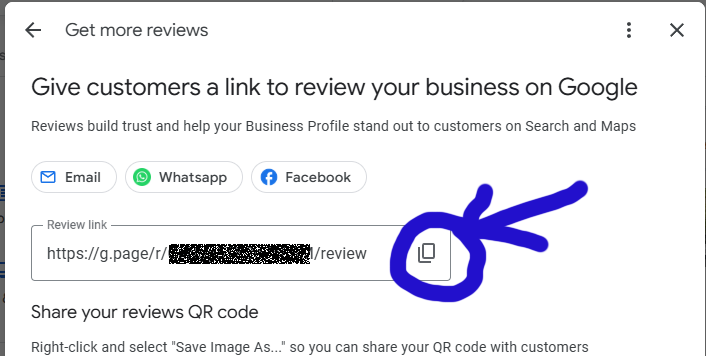
A screenshot showing Google’s
Step #3
Copy Your Link Click on the copy icon and now you have your google review link.

Logo for ReviewWeb, featuring a blue speech bubble with five yellow stars and a network pattern. Next to it, the text says "ReviewWeb.com – Reviews & Business Reputation Management Made Easy.

SMS Alerts Signup Form

Get alerted with you get a new review!
New Subscriber Agrement Statement

I agree to receive text messages from Review Web. I know that message and data rates may apply, message frequency may vary and carrirers are not liable for delayed or undelivered messages. I know I can always text 701-248-0000 with the word "help" for help or "stop" to unsubscribe. I have reviewed and accepted the terms and conditions of the website as well as the privacy policy.